LCD vs OLED vs AMOLED: Which Phone Display Is Actually Better?
From IPS and VA panels to self-lit OLED pixels, here is what the specifications mean and what buyers should check before choosing a phone or monitor.
Buying a smartphone is no longer only about the processor, camera or battery. The screen determines how every photograph, film, game, webpage and message looks. Yet specifications such as LCD, IPS, VA, OLED and AMOLED are often presented as if they all describe the same thing.
They do not. Some terms describe how a display produces light, while others describe how liquid crystals or pixels are controlled. Understanding that hierarchy makes comparing devices much easier.
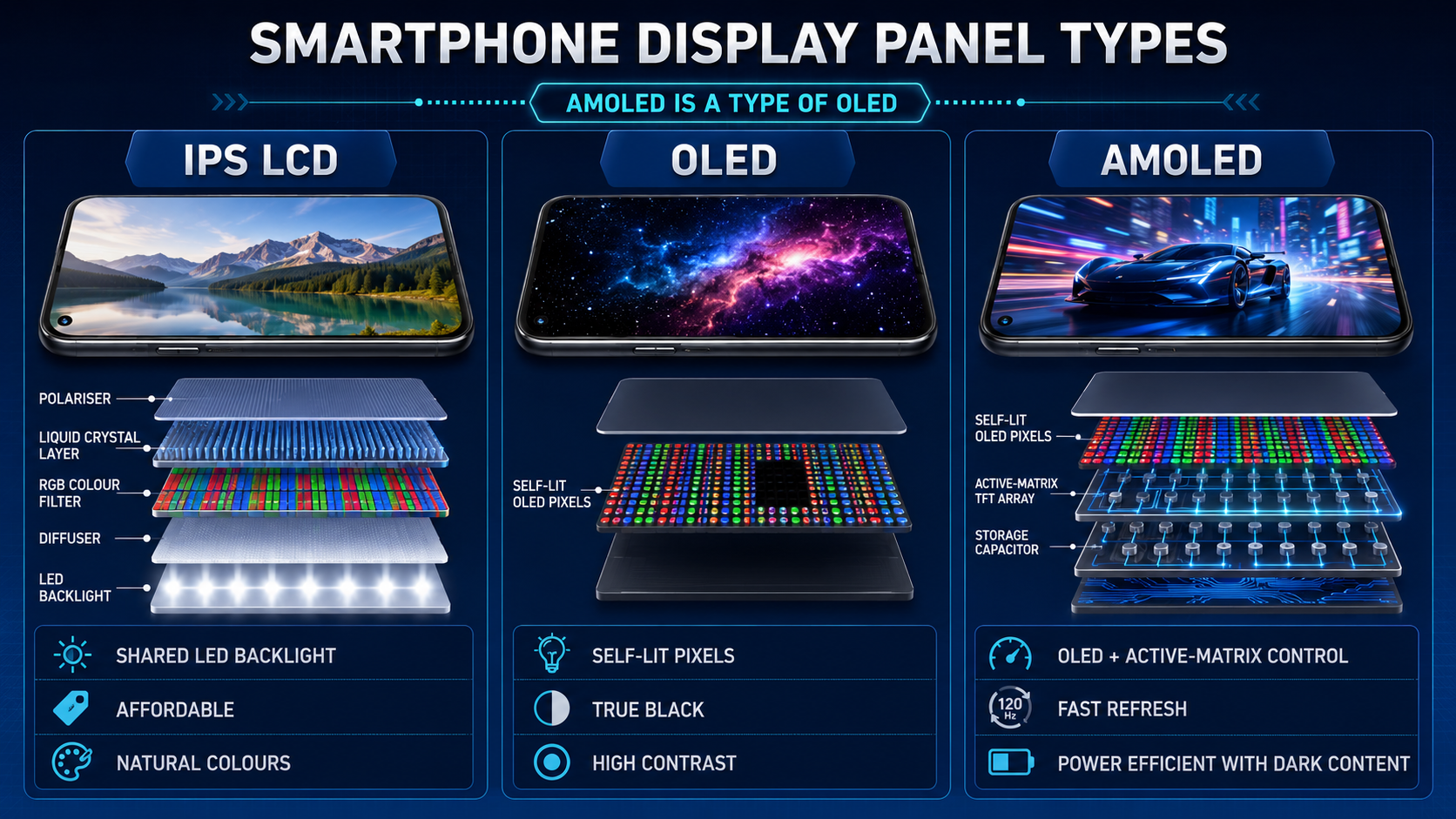
First, understand the display family tree
LCD family
A shared LED backlight shines through liquid crystals and colour filters. IPS, VA and TN describe different ways those crystals are arranged and moved.
OLED family
Every pixel produces its own light. AMOLED, P-OLED, Super AMOLED and Dynamic AMOLED are implementations or marketing variants within the broader OLED family.
How an LCD display works
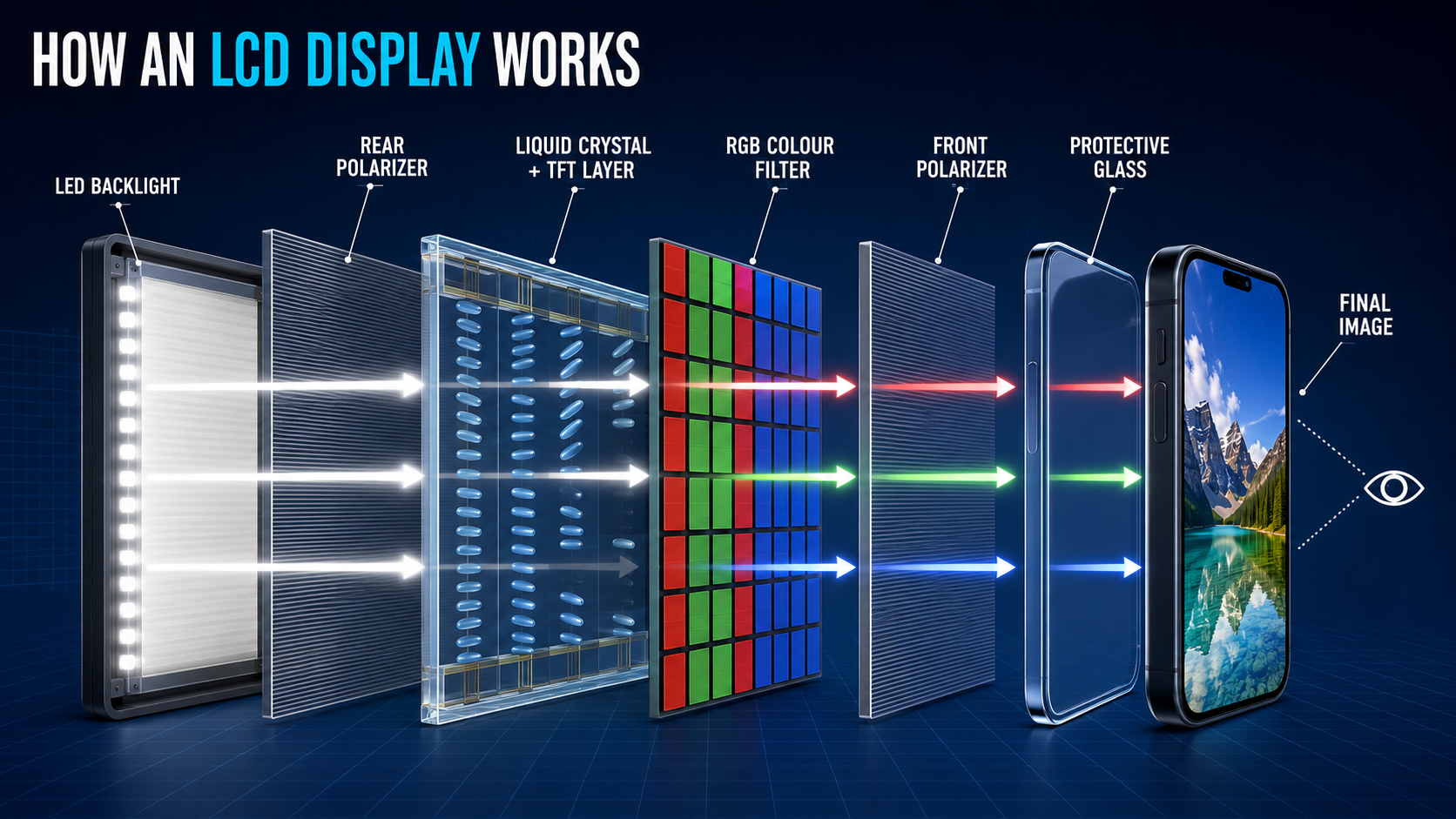
LCD stands for Liquid Crystal Display. Its pixels cannot illuminate themselves, so the panel needs a separate LED backlight. Light passes through a polarizer, a liquid-crystal layer and red, green and blue filters before forming the picture.
The liquid crystals change their orientation when voltage is applied, controlling how much light can pass through each subpixel. Because the backlight remains behind the entire panel, black areas cannot normally become completely dark. Some light leakage remains, making black appear dark grey in a dim room.
Why manufacturers still use LCD
LCD remains common in affordable phones, tablets, laptops and monitors because it is mature, widely available and relatively inexpensive to replace. It does not suffer from conventional OLED burn-in and can deliver excellent colour accuracy when properly calibrated.
Its disadvantages are lower contrast, thicker construction and limited benefit from dark mode because the backlight still consumes power behind black content.
IPS: the most common high-quality LCD type
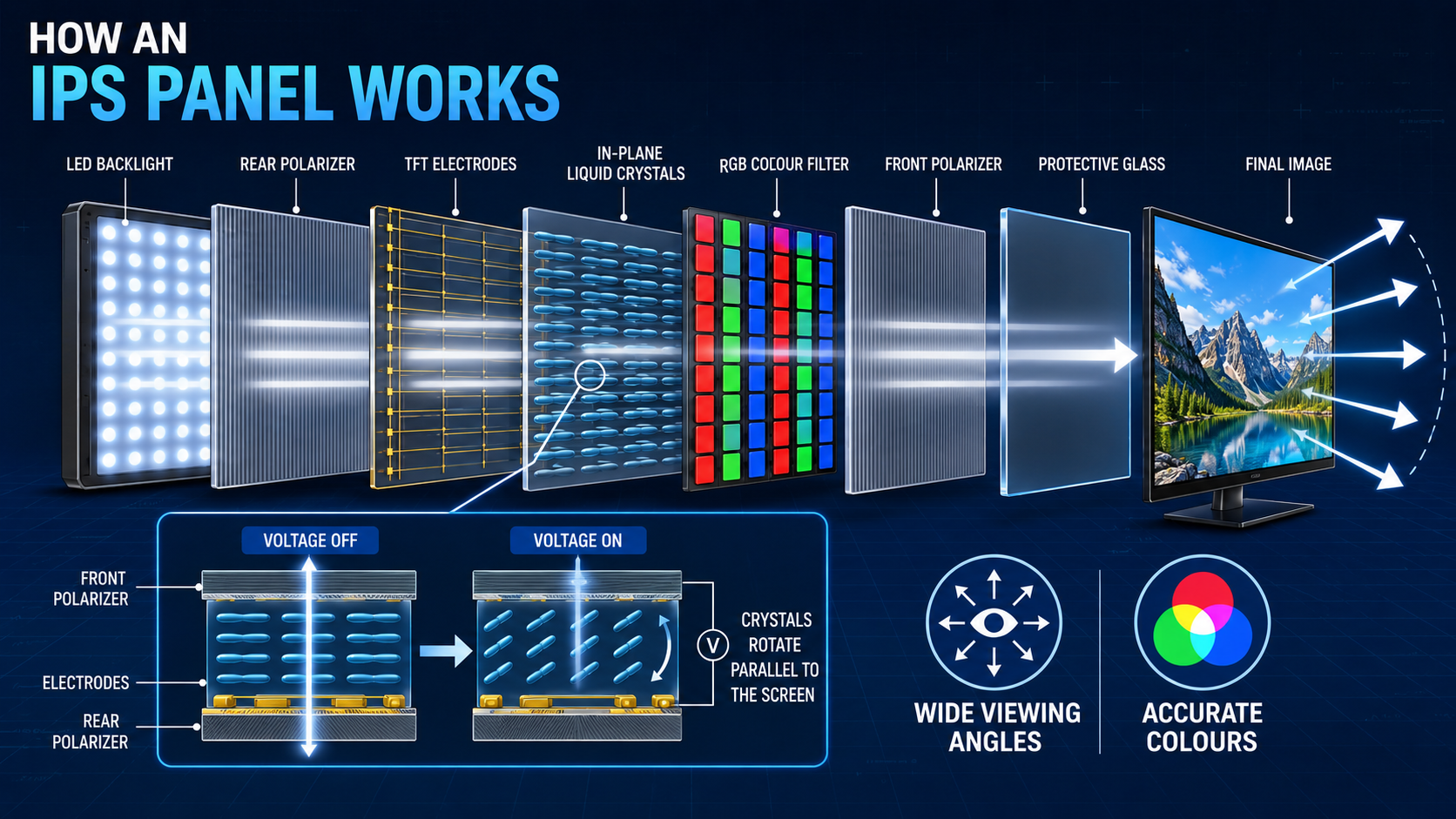
IPS means In-Plane Switching. In an IPS panel, liquid-crystal molecules rotate parallel to the screen rather than tilting strongly towards or away from the viewer. This helps colours and brightness remain consistent when the display is viewed from the side.
IPS is valued for accurate colours, clear text and wide viewing angles. It is widely used in office monitors, professional displays, laptops, tablets and LCD smartphones.
IPS strengths
- Wide viewing angles
- Reliable colour accuracy
- Sharp text and strong all-round image quality
- Fast IPS versions support high refresh rates
- No conventional OLED burn-in
IPS limitations
- Lower native contrast than VA
- Black areas can look grey in a dark room
- “IPS glow” may appear near corners when viewed in low light
VA: deeper blacks among LCD panels
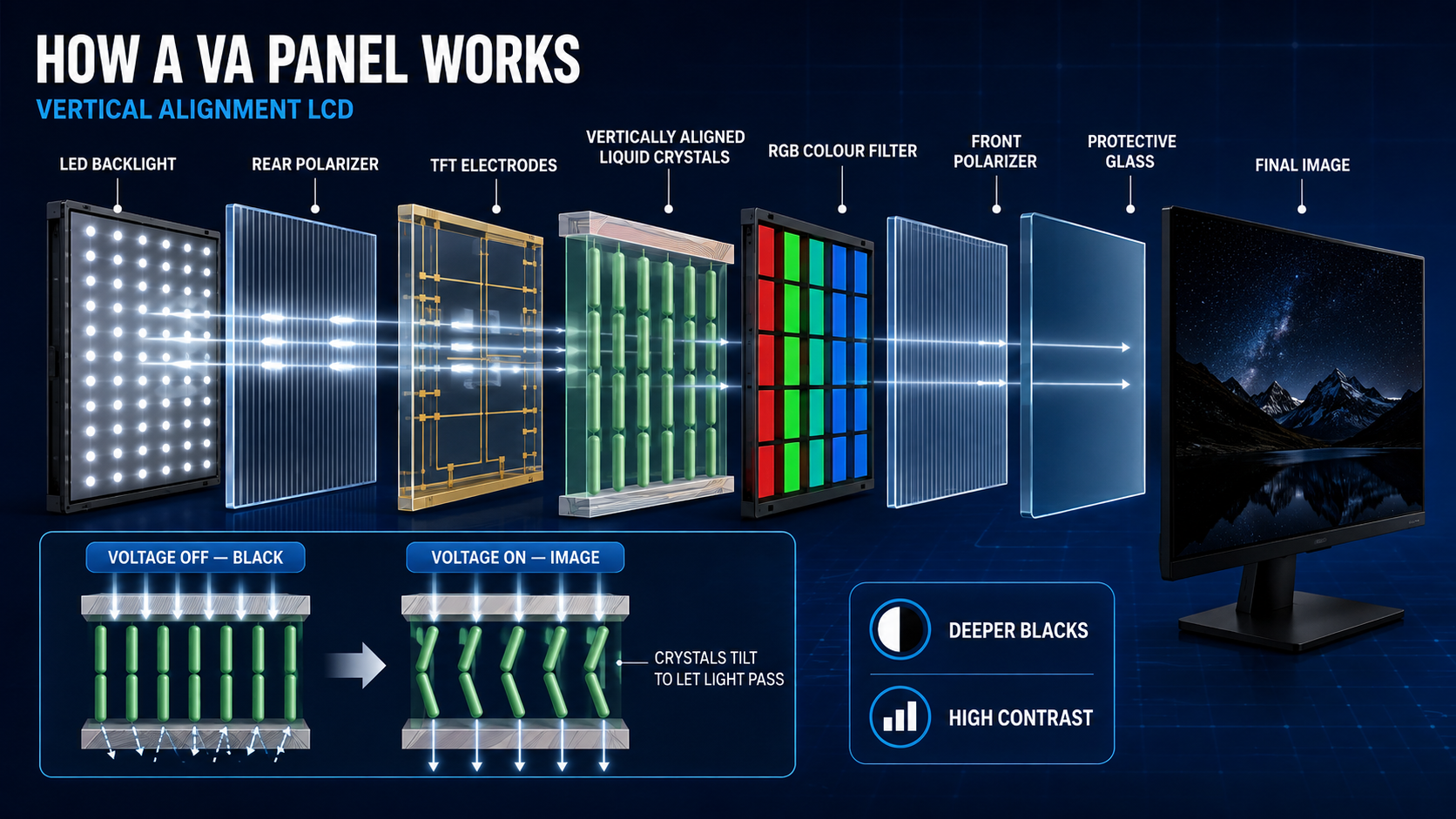
VA stands for Vertical Alignment. With little or no voltage applied, its liquid-crystal molecules are aligned approximately perpendicular to the glass, restricting light and producing a dark state. When voltage is applied, the molecules tilt and allow controlled light to pass.
This construction usually gives VA panels much higher native contrast and deeper blacks than IPS or TN. VA is common in televisions, curved monitors and entertainment-focused displays. It is far less common in modern smartphones than IPS LCD or OLED.
VA strengths
- High native contrast
- Deeper blacks than IPS
- Very good for films and dark-room viewing
- Often available in curved and ultrawide monitors
VA limitations
- Narrower ideal viewing angles than IPS
- Some panels show dark smearing during motion
- Colour and brightness can shift when viewed off-centre
How OLED changes the picture
OLED stands for Organic Light-Emitting Diode. Unlike LCD, it does not require a shared backlight. Each red, green and blue subpixel produces its own light when electrical current passes through organic material.
When an OLED pixel needs to display black, it can switch off completely. This creates extremely high contrast, excellent dark scenes and more efficient operation when genuinely dark content is shown.
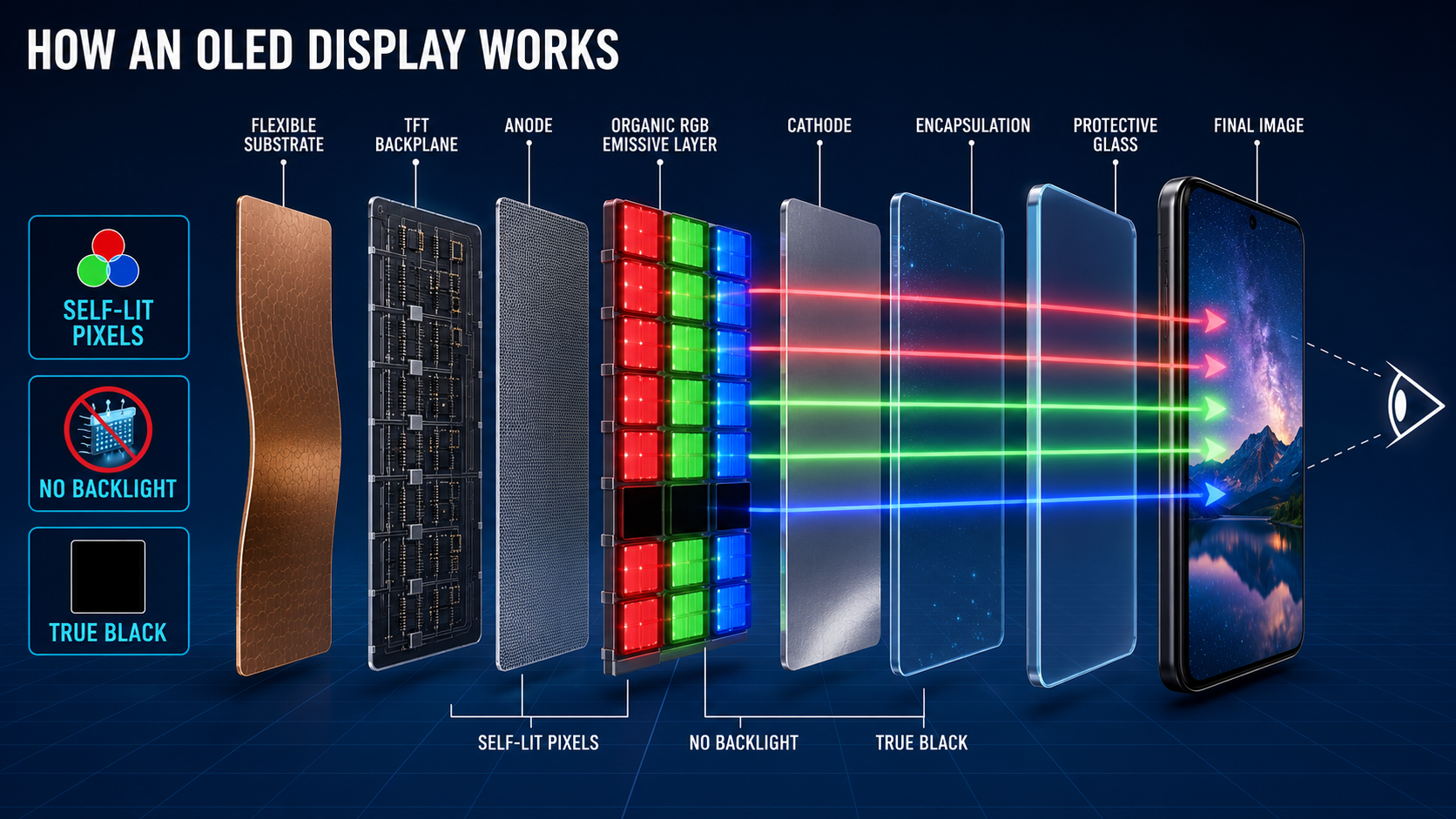
OLED panels are thin, respond quickly and can be built on flexible substrates for curved and foldable devices. They are widely used in premium smartphones and increasingly appear in tablets, laptops, monitors and televisions.
The main concerns are price, costly repairs and possible image retention or burn-in after prolonged exposure to bright, static interface elements. Modern software reduces the risk, but it cannot remove the underlying ageing characteristics of organic emitters.
AMOLED is OLED with active-matrix control
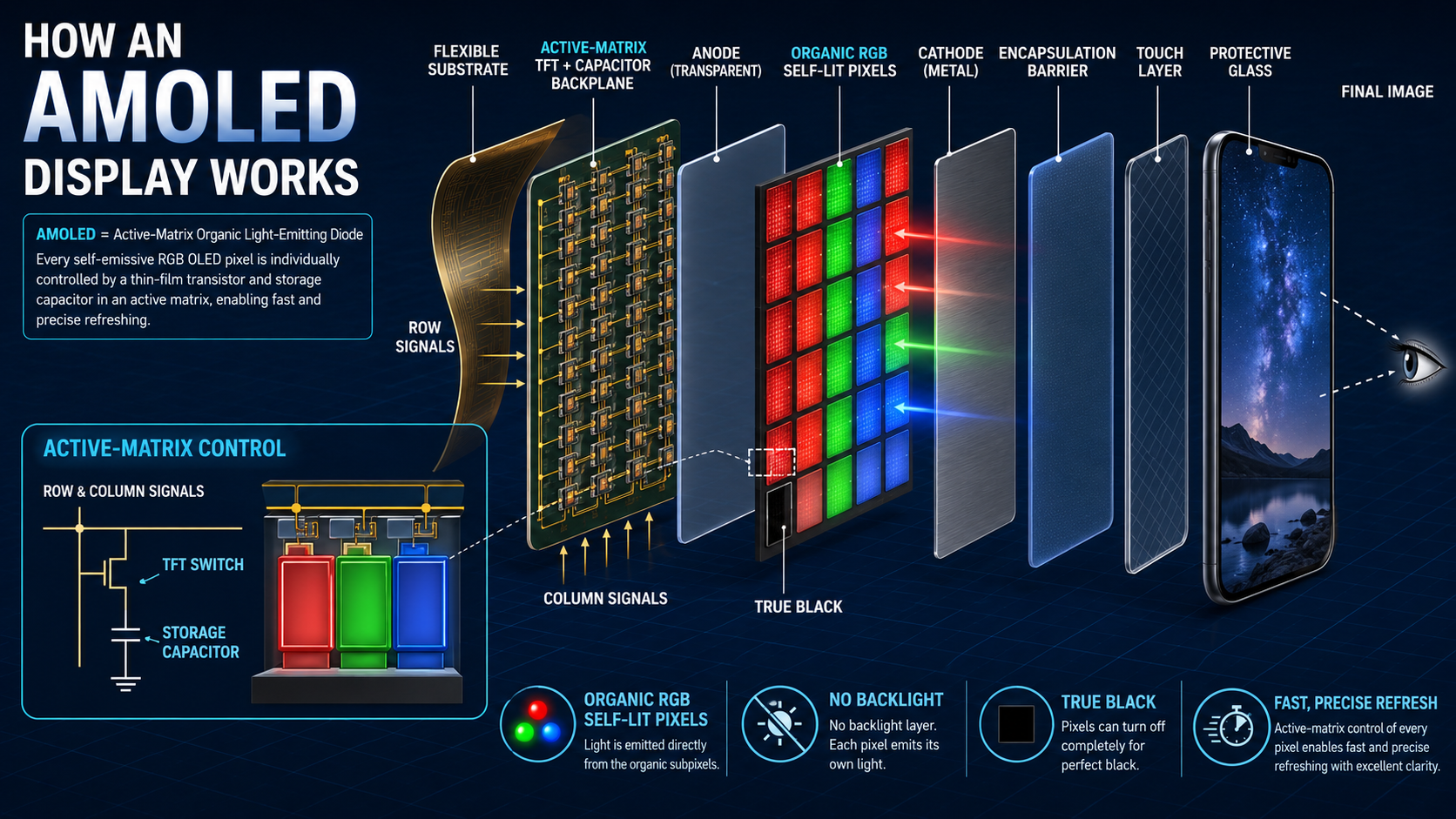
AMOLED means Active-Matrix Organic Light-Emitting Diode. It uses the same self-emissive principle as OLED, but adds a thin-film transistor and storage capacitor to control each pixel precisely.
The active matrix holds the required charge between refresh cycles, allowing millions of pixels to update quickly. That makes AMOLED suitable for high-resolution phones, high refresh rates, responsive gaming and always-on displays.
LCD vs OLED vs AMOLED: key differences
| Feature | IPS LCD | VA LCD | OLED/AMOLED |
|---|---|---|---|
| Light source | Shared LED backlight | Shared LED backlight | Self-emissive pixels |
| Black level | Moderate | Deep for LCD | Pixel can switch off |
| Viewing angles | Excellent | Good, but more shift | Excellent |
| Native contrast | Usually lower | High | Extremely high |
| Motion response | Good to excellent | Varies; dark smearing possible | Very fast |
| Burn-in risk | Not typical | Not typical | Possible over long-term static use |
| Dark-mode savings | Limited | Limited | Potentially meaningful |
| Typical use | Phones, laptops and office monitors | TVs and entertainment monitors | Premium phones and high-end displays |
Does AMOLED always use less battery?
No. AMOLED and OLED can save power when displaying black or dark content because those pixels emit little or no light. But bright white webpages may consume substantial power because many pixels must illuminate strongly.
Actual battery use depends on screen brightness, refresh rate, resolution, panel efficiency, displayed content and software. A 120Hz high-brightness AMOLED screen can consume more energy than a modest LCD in some situations.
Which display is better for eye comfort?
No panel type is universally safest for every user. Some OLED screens control low brightness through pulse-width modulation, rapidly switching pixels on and off. Most users do not consciously see this, but people sensitive to flicker may experience fatigue or headaches.
LCD backlights can also flicker depending on their dimming system. Buyers sensitive to flicker should check independent PWM measurements, test the device personally and avoid using extremely low brightness in a dark room.
Do not buy a phone based only on “AMOLED”
A good IPS display can outperform a poorly calibrated AMOLED in brightness, colour accuracy or outdoor visibility. Likewise, an inexpensive OLED panel may not provide the same HDR quality, efficiency or durability as a premium one.
Which display should you choose?
Practical recommendations
- Budget smartphone: a bright, well-calibrated IPS LCD remains a sensible choice.
- Films and streaming: OLED or AMOLED offers superior blacks and contrast.
- Mobile gaming: choose a responsive 120Hz AMOLED or Fast IPS panel, then check whether the processor sustains the frame rate.
- Office monitor: IPS is the safest all-round option for text, productivity and wide viewing angles.
- Movies on a monitor or TV: VA offers strong LCD contrast; OLED delivers the best black level if budget permits.
- Photo and design work: prioritise measured colour accuracy and calibration over the panel label.
Final verdict
For most premium smartphone buyers, OLED or AMOLED provides the strongest overall combination of contrast, black levels, viewing angles and responsiveness. IPS LCD remains valuable for affordable devices, dependable colour and freedom from conventional burn-in. VA is best understood as a high-contrast LCD choice for televisions and monitors rather than a mainstream phone technology.
The most important lesson is simple: the technology name does not guarantee panel quality. Compare brightness, colour accuracy, refresh behaviour, dimming, HDR performance, durability and repair cost before deciding.
Sources and technical references
Technical background reviewed against Apple’s OLED display guidance, Google Pixel screen-care guidance and Android Authority’s LCD and AMOLED explainer. Product performance varies by panel supplier, calibration and device implementation.